

What Is CRM Data Management?
CRM data management is the process of collecting, organizing, standardizing, cleansing, integrating, securing, and maintaining customer information within a CRM system. Its purpose is to ensure that customer records remain accurate, complete, accessible, and reliable across teams.
It covers five core activities:
- Data collection: Capturing customer information from website forms, emails, calls, client portals, and connected systems.
- Data standardization: Applying consistent formats, naming conventions, picklists, and field requirements.
- Data cleansing: Identifying duplicate records, correcting errors, and filling missing information.
- Data integration: Connecting the CRM with accounting, document management, marketing, and other business systems.
- Data governance and security: Defining data ownership, access permissions, retention policies, and audit requirements.
The 4 Types of CRM Data
For practical CRM management, customer information can be grouped into four broad categories. Understanding these categories helps businesses determine how to organize, maintain, and protect different types of records.
| Type | What It Includes |
|---|---|
| Identity Data | Names, email addresses, phone numbers, and physical addresses |
| Descriptive Data | Industry, company size, job title, and other attributes |
| Quantitative Data | Transactions, financial values, and interaction counts |
| Qualitative Data | Notes, feedback, communication history, and observations |
Each category requires appropriate maintenance. Contact details may become outdated when clients change jobs or contact information. Financial and transaction data should be validated against the relevant source system, such as accounting or billing software. Notes and communication records should also be kept accurate, relevant, and accessible only to authorized users.
Understanding these differences helps businesses establish appropriate data validation, ownership, and access rules within their CRM.
Why CRM Data Management Matters
Poor data quality can affect business performance, customer relationships, and operational efficiency. Gartner estimates that poor data quality costs organizations at least $12.9 million a year on average.
Within a CRM, these problems can affect four key areas:
Sales and decision-making:
Duplicate contacts, outdated phone numbers, and incomplete records waste sales teams’ time. Inaccurate deal stages and missing information can also lead to unreliable forecasts.
Automation and AI:
Automated workflows, lead scoring, and AI-powered tools depend on the quality of the data they use. Incorrect contact details or outdated customer statuses can trigger irrelevant messages and unreliable outputs.
Customer visibility:
When customer information is scattered across different systems, teams struggle to access a complete and consistent view of each relationship. This makes it harder to coordinate interactions and identify customer needs.
Data security and trust:
Inaccurate, poorly managed, or unnecessarily retained personal information can create privacy and compliance risks. Incorrect communications and mishandled customer records can also damage trust.
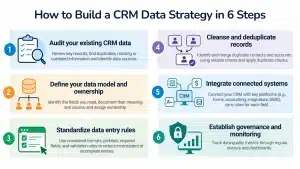
How to Build a CRM Data Strategy in 6 Steps
A CRM data strategy defines what customer information a business collects, where that data comes from, who is responsible for maintaining it, and how it is kept accurate, secure, and accessible. Whether you’re improving an existing CRM or implementing a new one, these six steps provide a practical starting point.
1. Audit your existing CRM data
Review the main record types, such as contacts, accounts, leads, and opportunities. Identify duplicate records, incomplete fields, outdated information, and the systems feeding data into your CRM. This assessment establishes a baseline for measuring improvements.
2. Define your data model and ownership
Identify the fields your business needs for reporting, customer management, and decision-making. Document what each field means, where its information comes from, and who is responsible for maintaining it. For example, lead source can be automatically captured from a website form and maintained by the marketing team.
3. Standardize data entry rules
Establish consistent formats for names, phone numbers, addresses, dates, and other important fields. Use picklists for predefined values, appropriate required fields, and validation rules to reduce inconsistent or incomplete entries.
4. Cleanse and deduplicate records
Identify and merge duplicate contacts and accounts using reliable matching criteria, such as email addresses, phone numbers, or company identifiers. Apply duplicate checks during data entry to prevent the same records from being created again.
5. Integrate connected systems
Connect your CRM with the platforms that generate or use customer information, such as website forms, accounting software, e-signature tools, and document management systems. Define which system is the source of truth for each data field and how information should be synchronized.
6. Establish governance and monitoring
Define role-based access permissions, data retention rules, and responsibilities for maintaining CRM data. Monitor data-quality metrics through regular reviews and dashboards, and assign an accountable owner to oversee the overall data management process.
Following these steps helps establish consistent data practices, reduce errors, and make CRM information more reliable across business operations.
If you are still shaping the bigger picture, start with your overall CRM strategy. The data strategy should serve the business goals it sets.
CRM Data Management Best Practices
A CRM data strategy establishes the rules for managing customer information. These everyday practices help employees follow those rules and maintain reliable records as customer data changes.
1. Capture Information at the Point of Interaction
Record relevant customer details when they are collected, whether through a sales call, email, website inquiry, or support interaction. Delayed updates can lead to forgotten details and incomplete records.
2. Collect Only the Information You Need
Avoid asking customers for unnecessary information. Keep forms and data-entry fields relevant to the purpose of collection. This makes the process easier for customers and reduces the amount of information your business needs to maintain.
3. Provide Clear Data-Entry Instructions
Employees should understand what information belongs in each CRM field. For example, explain the difference between a company name and a contact’s job title, or what qualifies as a sales-qualified lead. Clear instructions reduce inconsistent entries.
4. Validate Data Before Importing It
Before uploading spreadsheets or transferring records from another system, check for missing values, incorrect formats, outdated details, and duplicate entries. Test a small sample before importing large datasets.
5. Record Customer Interactions Promptly
Log relevant calls, emails, meetings, and support interactions in the appropriate customer record. Include important context and agreed next steps rather than relying on individual employees to remember previous conversations.
6. Keep Customer Records Relevant
Review records when meaningful changes occur, such as a change in contact details, customer status, account ownership, or business requirements. Update outdated information and remove records that no longer need to be retained, in line with applicable retention policies.
7. Avoid Using the CRM as a Document Dump
Store customer documents in appropriate document-management systems and link them to the relevant CRM records where possible. This keeps customer information organized and makes it easier to locate the correct version of a document.
8. Train Employees on Consistent CRM Usage
Provide practical guidance on entering information, updating records, logging interactions, and handling customer data. Periodic training helps ensure that employees use the CRM consistently rather than developing their own workarounds.
Following these practices makes CRM data more dependable in everyday operations and helps teams get greater value from the information they maintain.
How to Migrate CRM Data Without Losing It
Migrating from spreadsheets or a legacy CRM is an opportunity to improve data quality before moving to a new system. However, incomplete field mapping, missing records, and broken relationships can create problems after migration.
Follow these five steps to reduce the risk:
1. Audit the source systems
Identify every location where customer data is stored, including the existing CRM, spreadsheets, email contacts, and billing systems. Record the number of records, data formats, and relationships between different records.
2. Decide what needs to be migrated
Not every record needs to move to the new CRM. Define selection criteria based on business requirements, such as recently active contacts, current customers, or accounts with ongoing engagements. Archive records that do not need to be migrated, while following applicable data-retention requirements.
3. Map fields and relationships
Match each field in the source system to its corresponding field in the new CRM. Document changes in field formats, naming conventions, and data types. Also map relationships between records, such as contacts and accounts, so they remain connected after migration.
4. Clean and test the data before migration
Correct formatting issues, remove duplicates, and address incomplete records in a staging copy. Run a test migration with a representative sample to identify mapping errors and confirm that records transfer correctly.
5. Validate the migrated data
Compare record counts between the source and destination systems, check important customer records, and verify that relationships between contacts, accounts, and associated documents remain intact. Keep the old system available in read-only mode until the migration has been validated.
CRM Data Management by Industry
CRM data management principles apply across industries, but the information businesses need to maintain and the challenges they face can differ.
Law Firms
Law firms may have conflicting contact records across multiple matters, with important intake notes scattered across emails. Maintaining a centralized client record linked to every relevant matter helps teams access consistent information. Standardized conflict-check fields during intake can also improve record management.
Tax and Tax-Resolution Firms
Leads often come from multiple sources, making it difficult to track their origin. Client documents, such as IRS notices and tax returns, may also be disconnected from CRM records. Automatic lead-source tagging and linking documents to the relevant client record can improve visibility. Learn more about CRM document management integration.
Accounting Firms
Customer information may be spread across the CRM, practice-management software, and billing systems. Integrating these systems and synchronizing relevant billing information can reduce fragmented records. Standardized engagement-status fields also help maintain consistent information.
Mortgage Lenders and Brokers
Borrower information may need to be entered repeatedly across loan origination systems (LOS), CRMs, and marketing platforms. Integrating the CRM with the loan origination system can reduce duplicate data entry. Financial information should also be protected through appropriate access controls.
Financial Services
Referral and partner leads may arrive through different channels and in inconsistent formats. Using structured partner IDs and portal-based lead submission helps standardize incoming information and improve lead attribution.
CRM Data Quality KPIs to Track
To understand whether your CRM data management efforts are working, track a few key data quality metrics regularly. These four KPIs provide a starting point for monitoring the condition of customer records.
1. Data Completeness
How to measure: Percentage of records containing all required fields.
What to monitor: Track critical fields such as email addresses, phone numbers, and customer status. Set targets based on business requirements, such as having valid email addresses for 95% of active contacts.
2. Duplicate Rate
How to measure: Number of suspected duplicate records divided by the total number of records, multiplied by 100.
What to monitor: A declining duplicate rate indicates better record management. Also check whether new duplicates continue to appear after cleanup.
3. Data Accuracy
How to measure: Percentage of records in a randomly selected sample that are verified as correct.
What to monitor: Check details such as email addresses, phone numbers, and mailing addresses against reliable sources. Bounced emails, returned mail, and incorrect phone numbers can indicate accuracy problems.
4. Data Freshness
How to measure: Percentage of active records reviewed or verified within a defined period.
What to monitor: Track whether important customer information is being updated when changes occur. A 12-month review period can serve as a starting point, but the appropriate frequency depends on how quickly the information changes.
Alongside these metrics, track a business-related measure such as the percentage of leads with a known source. This connects CRM data quality to outcomes that matter to business teams.
A CRM dashboard can bring these metrics together, making it easier to monitor trends and identify areas that need attention.
Technology That Supports CRM Data Management
You may not need a separate data management platform to maintain reliable CRM data. In many cases, a combination of CRM features and connected tools can support the process. Four technology layers are particularly useful:
Native CRM features:
Use validation rules, required fields, picklists, duplicate detection, workflows, and audit logs to maintain consistent records and reduce manual errors. Platforms such as SugarCRM offer features that support these activities, depending on the configuration.
System integrations:
Connect the CRM with website forms, client portals, accounting software, and other business systems. APIs and integration platforms help synchronize information and reduce repeated data entry.
Document management systems:
Link a document management system (DMS) to CRM records so that relevant files can be accessed alongside customer information. This helps keep documents organized and associated with the correct records. Learn more about CRM document management.
Reporting and dashboards:
Use CRM reports and dashboards to monitor data quality metrics such as completeness, duplicate rate, accuracy, and freshness. This helps teams identify recurring issues and track improvements over time.
The right combination depends on your CRM platform, existing systems, data requirements, and business processes.
Case Study: Improving Partner Lead Data Management
A U.S.-based financial services firm relied on referral partners to generate leads. However, fragmented submissions, manual data entry, and inconsistent lead-source tracking made lead management difficult.
Nablasol integrated a custom partner portal with SugarCRM to streamline the process:
- Partners submit referrals through structured forms, with each referral assigned a unique lead ID.
- Submissions flow directly into SugarCRM, reducing manual data entry.
- Partner identifiers and referral tags improve lead-source tracking.
- Partners can monitor referral status, conversions, and commission information through the portal.
The solution improved lead capture, referral attribution, and consistency of partner-generated data.
Read the full partner portal integration case study
Make Your CRM Data Something Your Team Trusts
CRM data management isn’t a one-time cleanup task. It requires the right processes, integrations, and ongoing practices to keep customer information accurate and usable.
Nablasol helps businesses improve their CRM systems through CRM consulting and CRM implementation. From assessing existing data to designing data models and connecting systems, we help build a more reliable CRM environment.
Frequently Asked Questions
How can you improve data quality in a CRM system?
Start by auditing existing records to identify duplicates, missing fields, outdated information, and inconsistent formats. Then standardize data-entry rules, apply validation checks, automate data capture, and establish clear ownership for important fields. Regularly monitor metrics such as completeness, duplicate rate, accuracy, and freshness to identify issues before they affect business operations.
What are the best CRM data management practices for small businesses?
Small businesses can start with the data management features available in their existing CRM, such as validation rules, duplicate detection, workflows, and reporting dashboards. Additional tools may help with data cleansing, email verification, enrichment, and system integration.
What are the key components of effective CRM data management?
Effective CRM data management involves five key components: data collection, standardization, cleansing, integration, and governance. These processes help businesses capture customer information, maintain consistent records, correct errors, connect different systems, and control how data is accessed and maintained.